
ArenaPlus Frequently Asked Questions
Hot picks, slots, live dealer tables, and guides to help you play smarter.
Getting Started
What is ArenaPlus?
ArenaPlus is the #1 PAGCOR-licensed online sportsbook in the Philippines, providing a secure and engaging sports betting and streaming experience. Launched in 2023, ArenaPlus features a wide range of local and international sports and continues to expand its presence through key partnerships across major leagues, including the NBA, PBA, and PVL.
How do I create an ArenaPlus account?
You can register for an ArenaPlus account using your mobile number.
- Go to ArenaPlus.ph or open the ArenaPlus mobile app.

- Tap Sign In in the upper-right corner of the screen.

- Tap Create Account.
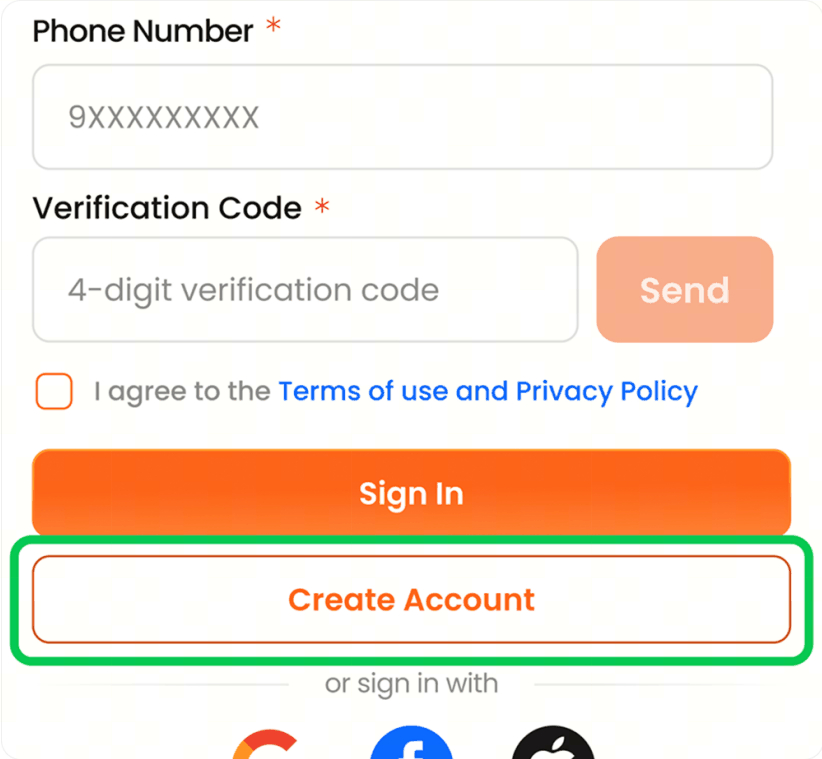
- Enter your mobile number.
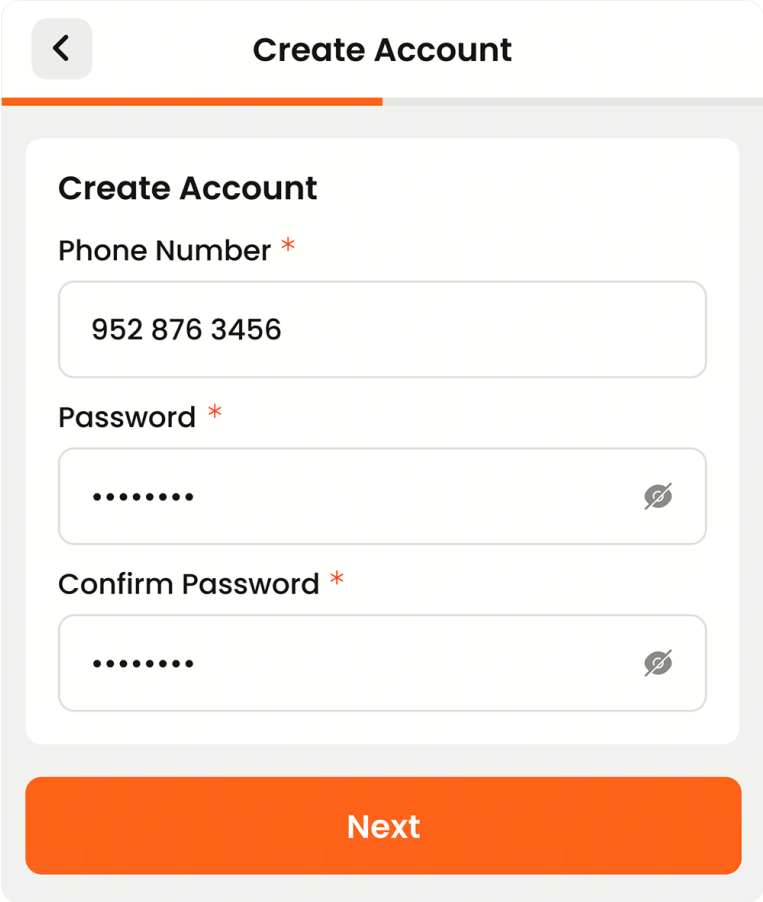
- Enter the 4-digit verification code sent to your mobile number.
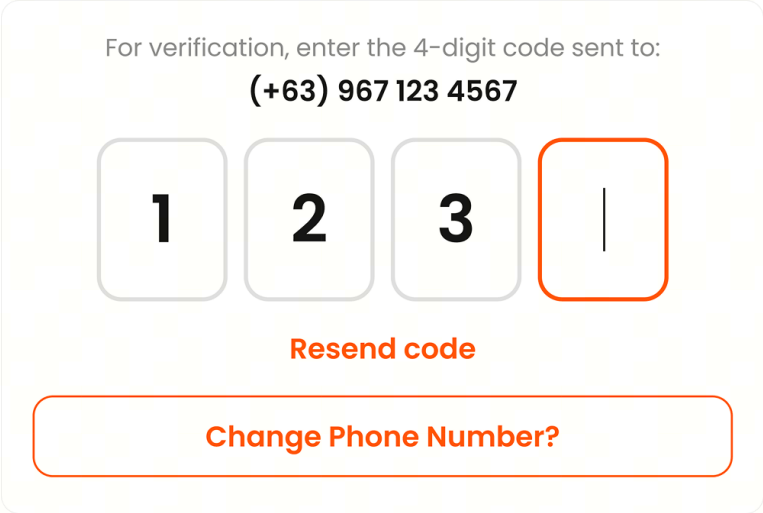
What is the age requirement to play?
You must be at least 21 years old to register and play on ArenaPlus, in accordance with Philippine gaming laws and PAGCOR regulations. By registering, you confirm that you meet this age requirement.
ArenaPlus reserves the right to request proof of age at any time and may suspend accounts if underage play is suspected.
The following persons are prohibited from participating, pursuant to Malacañang Memorandum Circular No. 8:
- Government officials and employees directly connected with government operations.
- Members of the Armed Forces of the Philippines (AFP), including the Army, Navy, and Air Force, and members of the Philippine National Police (PNP).
- Persons below 21 years of age.
- PAGCOR officials and employees.
- Unregistered players and banned individuals.
- Spouses, common-law partners, children, and parents of the persons listed above.
- Persons included in the National Database of Restricted Persons (NDRP).
- Holders of a Gaming Employment License (GEL).
- Financiers, loan sharks, and similar individuals.
Is ArenaPlus available on mobile?
Yes! The ArenaPlus app is available for both iOS (App Store) and Android.
You can download the iOS version and the Android APK version here.
The mobile app offers the same full range of games, deposits, withdrawals, and customer support features as the desktop version.
What information do I need to register?
To register, you'll need to provide:
- Full legal name
- Philippine mobile number
- Date of birth
- A secure password
For full account verification (KYC), you may later be asked to submit a government-issued ID (e.g., PhilSys ID, passport, or driver's license).
Can foreigners residing in or visiting the Philippines register?
Yes! Foreign nationals residing in or visiting the Philippines are welcome to register and play on ArenaPlus.
To verify your identity, you will need to submit one of the following:
- Passport and
- Alien Certificate of Registration (ACR)
Make sure that your document is valid and that the information matches the details you provided during registration.
Is ArenaPlus legal in the Philippines?
Yes. ArenaPlus is fully licensed and regulated by PAGCOR (Philippine Amusement and Gaming Corporation), the government agency that oversees and authorizes gaming activities in the Philippines.
All operations comply with Philippine laws, ensuring a legitimate and secure gaming experience.
You can find ArenaPlus on PAGCOR's official list here.
Account & KYC
How do I log in to my account?
To access your account, follow the steps below.
- Tap Sign In in the upper-right corner of the screen. You can log in using either a one-time code or your password.

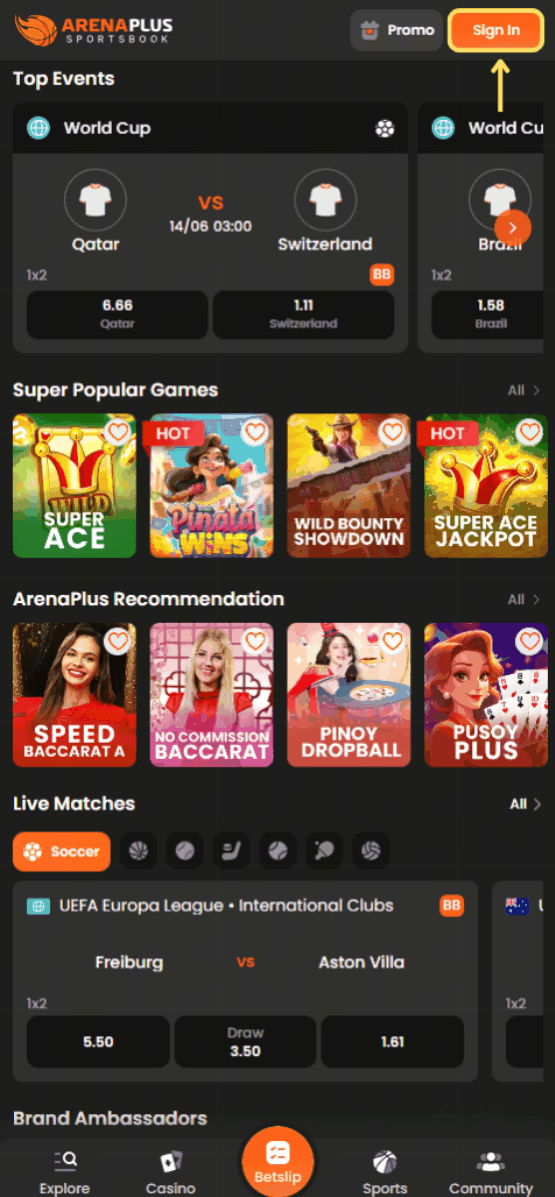
- Enter your registered mobile number. A verification code will be sent to you via SMS when using a one-time code to log in.
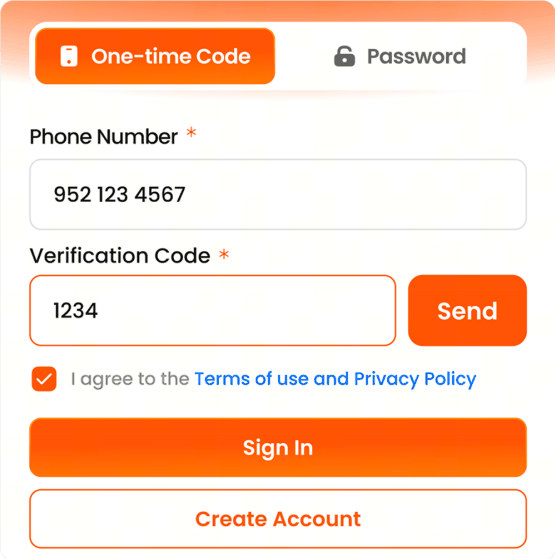
- If you are logging in using a one-time code, enter the 4-digit verification code. If you are logging in using your password, enter your registered password. Tick the box to confirm that you agree to the Terms of Use and Privacy Policy.

- Tap Sign In to access your account.

I forgot my password. How do I reset it?
You can reset your password in just a few minutes.
Follow the steps below:
- Tap Sign In in the upper-right corner of the screen.

- Select Forgot Password?
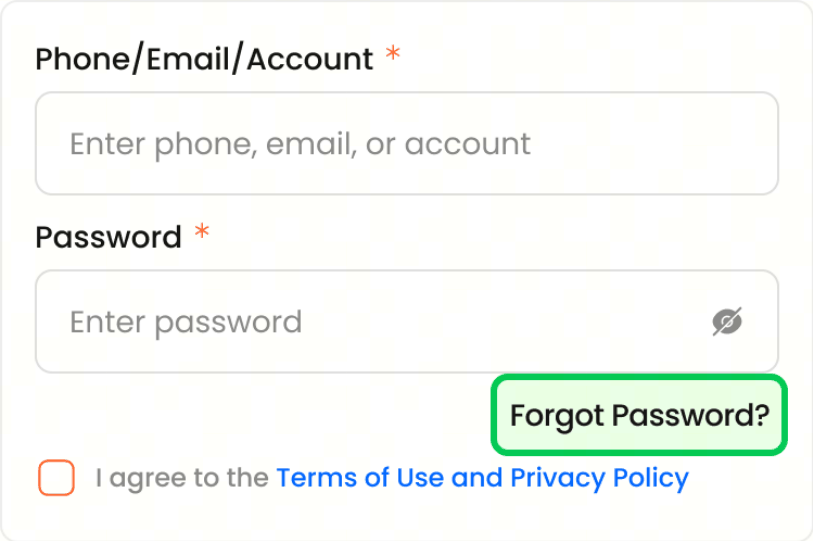
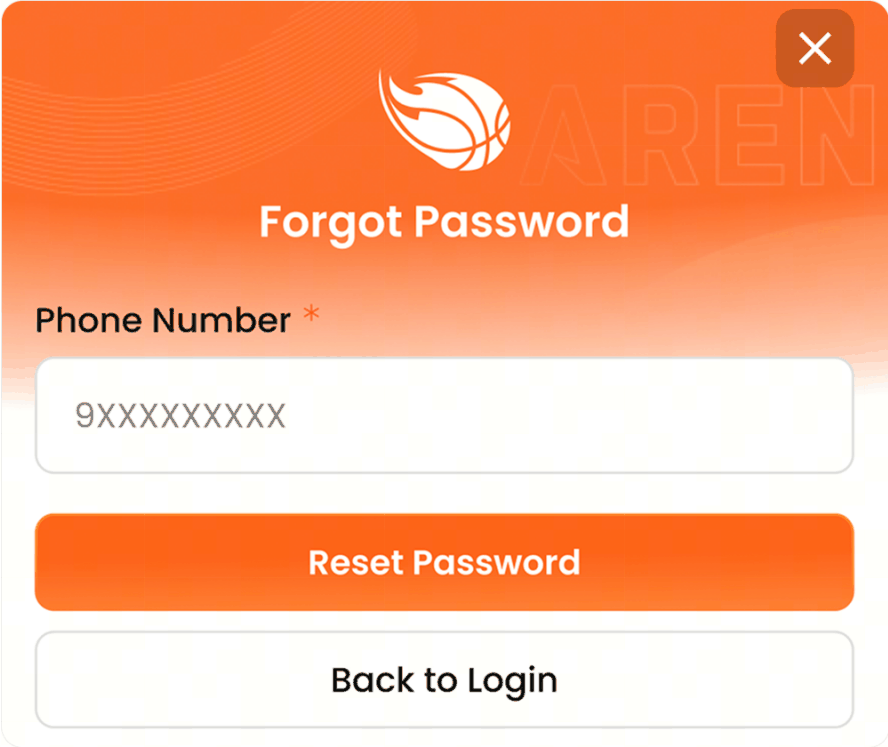
- Enter your registered mobile number, then tap Reset Password. A verification code will be sent to your mobile number.
- Enter the 4-digit verification code, then create and confirm your new password.
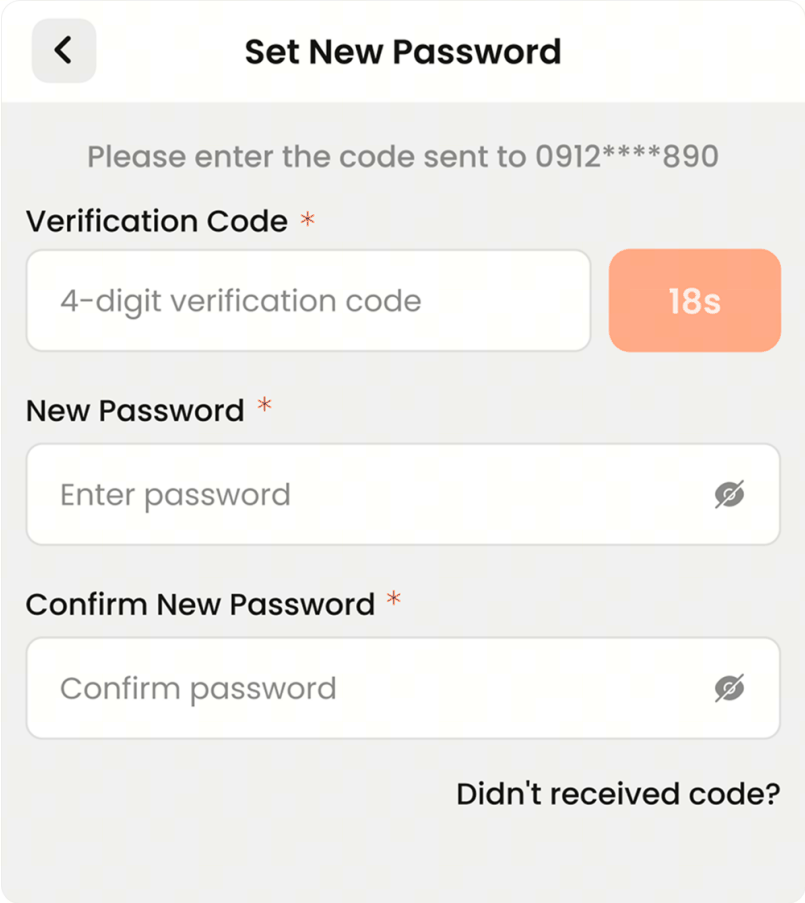
Note: When signing in with your new password, ensure that uppercase and lowercase letters are entered correctly.
What is KYC and why is it required?
KYC stands for Know Your Customer. It is a standard identity verification process required by PAGCOR to confirm your identity and ensure that you meet the legal age requirement (21+).
KYC also helps prevent fraud and supports responsible gaming.
How do I access KYC Settings?
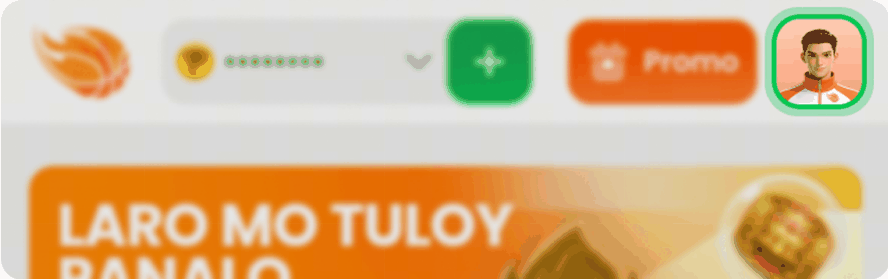
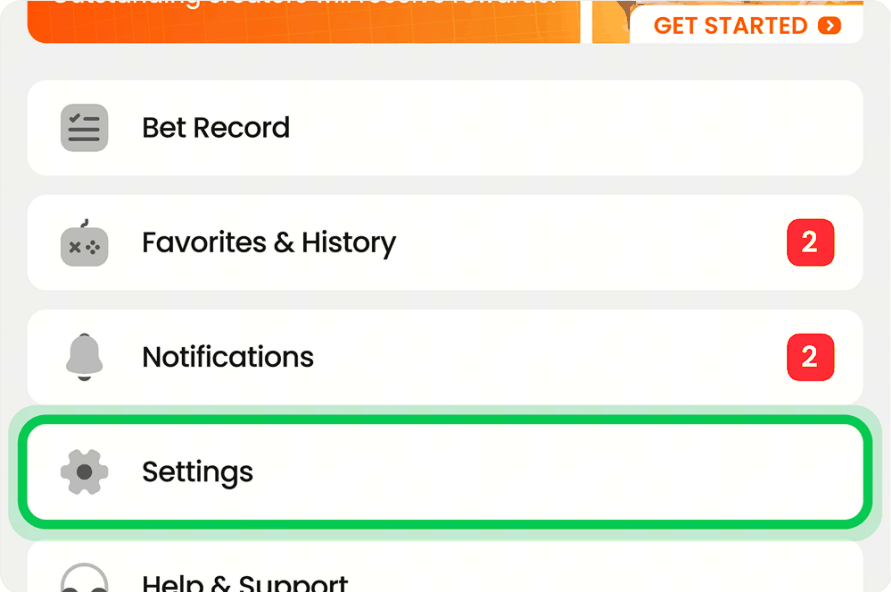
You can access your KYC Settings by navigating to Profile → Settings → Security Center → KYC Settings.
Follow the steps below:
- Tap your profile icon in the upper-right corner of the screen.
- Tap Settings.
- Select Security Center.
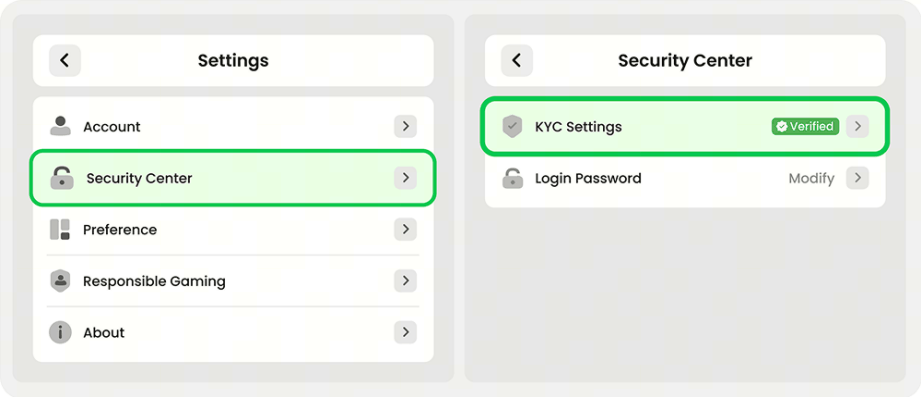
- Tap KYC Settings.
How do I verify my account (KYC)?
To verify your account, log in and go to KYC Settings under your profile settings.
Submit a clear photo or scan of a valid government-issued ID (e.g., PhilSys ID, passport, or driver's license).
Verification is typically completed within 24 to 48 hours.
Which ID documents are accepted for KYC?
The following government-issued IDs are accepted for KYC verification:
- Driver's License
- Passport
- Postal ID
- Voter's ID
- Tax Identification Number (TIN) Card
- SSS Card
- Senior Citizen ID
- Unified Multi-Purpose ID (UMID)
- National ID (PhilSys ID)
- PhilHealth ID
- OWWA ID
- OFW ID
- NBI Clearance
- Seaman's Book
- Alien Certificate of Registration (ACR) / Immigrant Certificate of Registration
- Integrated Bar of the Philippines (IBP) ID
- PNP Firearm License
Why is my ID being rejected?
Common reasons for ID rejection include:
- Poor image quality (e.g., blurry, too dark, or cropped)
- Expired ID or missing signature
- Tampered or altered documents
- Mismatched details (e.g., the information on your ID does not match your registration details)
- Unsupported document type
Note: Please resubmit a clear, complete, and valid photo of an accepted ID. If the issue persists, please contact Customer Support for assistance.
Can I have multiple accounts?
No. ArenaPlus allows only one account per person.
Creating multiple accounts is a violation of our Terms and Conditions and may result in the permanent suspension of all associated accounts, including the forfeiture of any balances or winnings.
If you believe a duplicate account was created in error, please contact Customer Support immediately.
How can I update my account information?
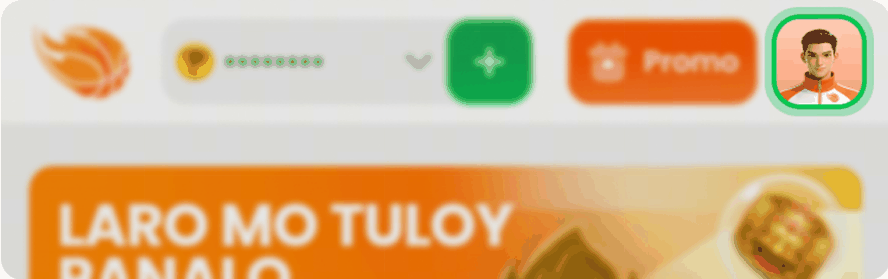
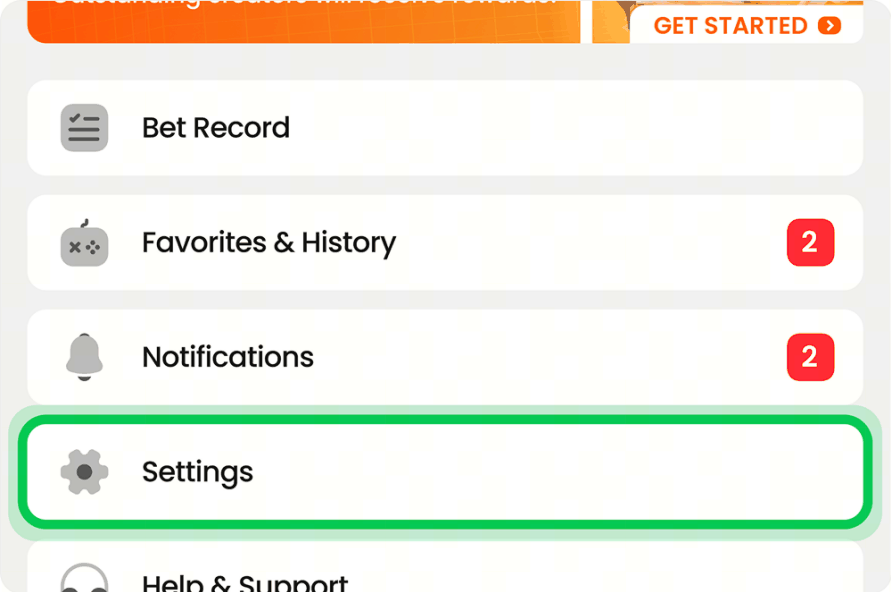
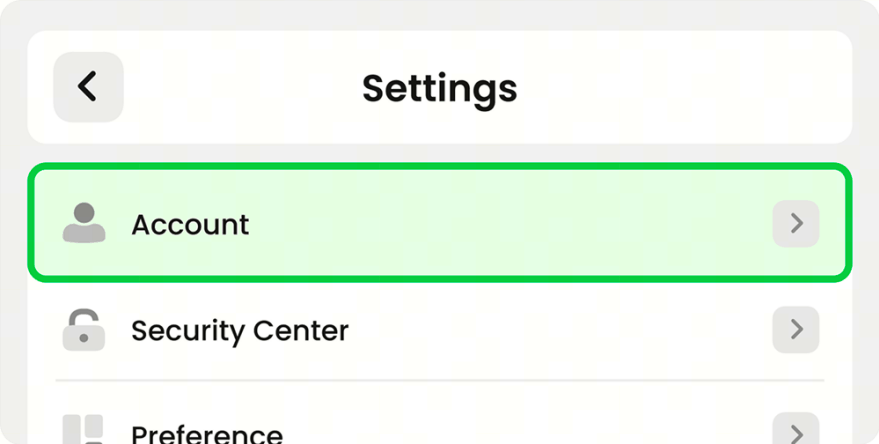
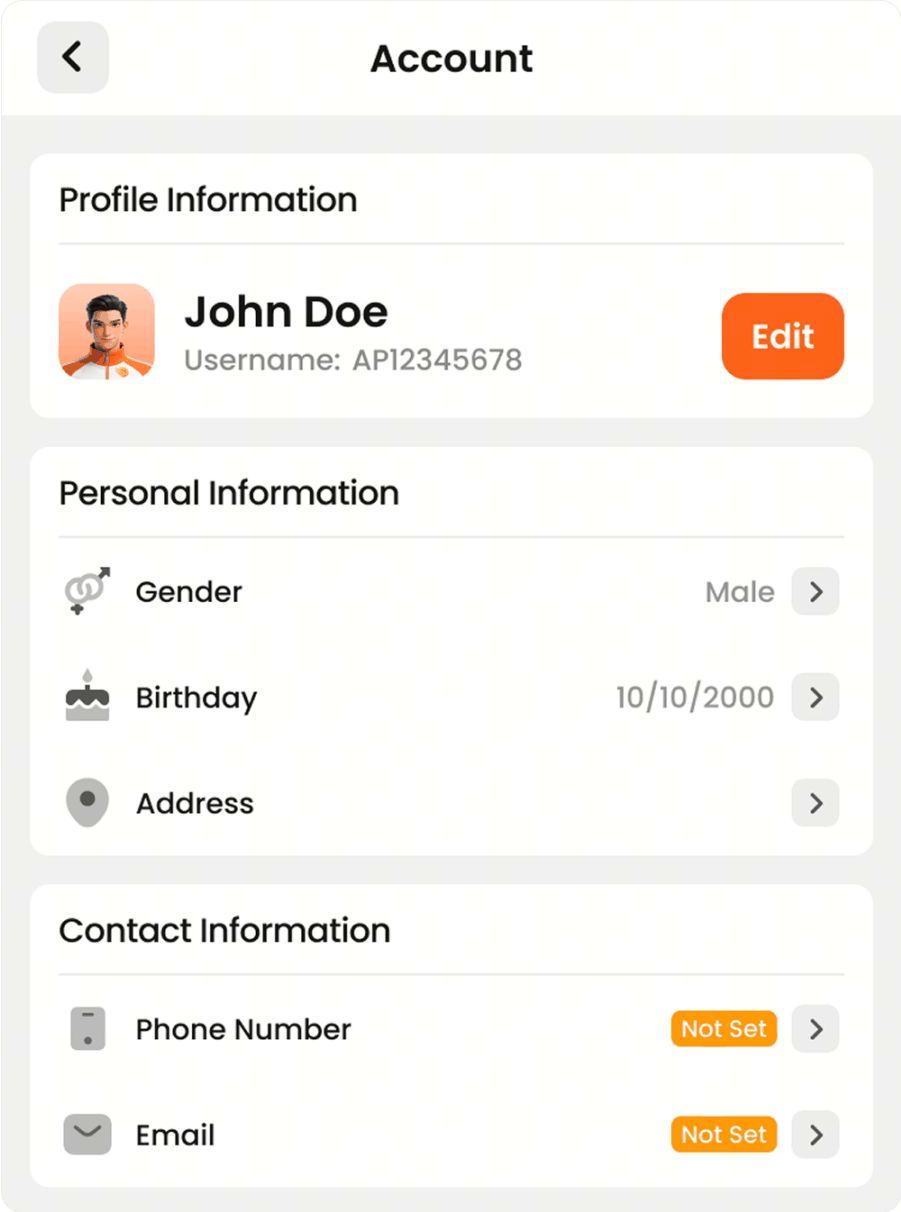
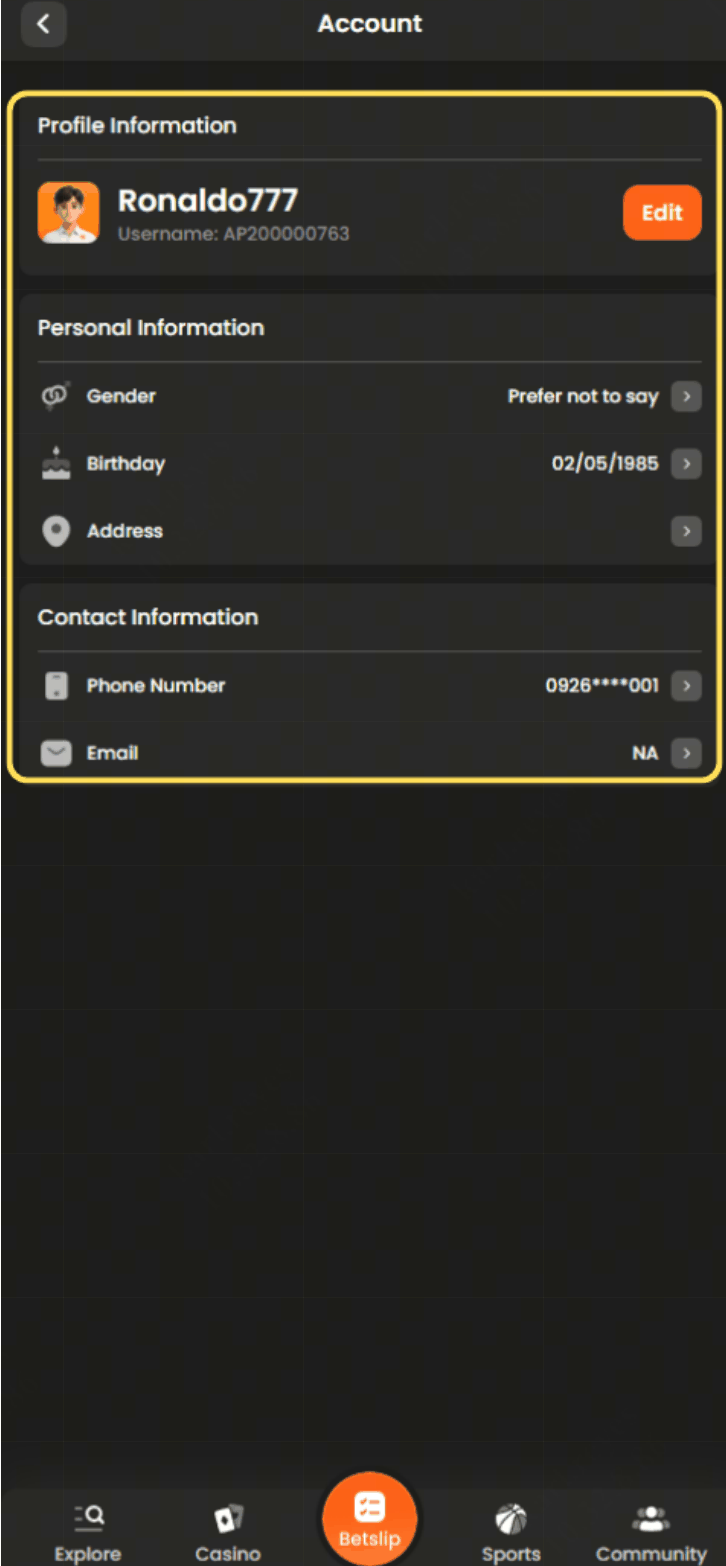
To update your account information, go to Profile → Settings → Account.
You can update certain personal and contact information as needed. Please note that some information, such as your full legal name and date of birth, may no longer be editable after account verification, as these details are linked to your KYC records.
For major changes, please contact Customer Support.
- Tap your profile icon in the upper-right corner of the screen.
- Tap Settings.
- Tap Account.
- Update your personal and contact information as needed.
Deposits
What deposit methods are available?
ArenaPlus supports various deposit methods, including GCash, Maya, bank transfers (BDO, BPI, UnionBank, and Metrobank), and Pay&Go.
Available deposit methods may vary depending on your location and account verification level.
How do I deposit using GCash?
Follow these steps:
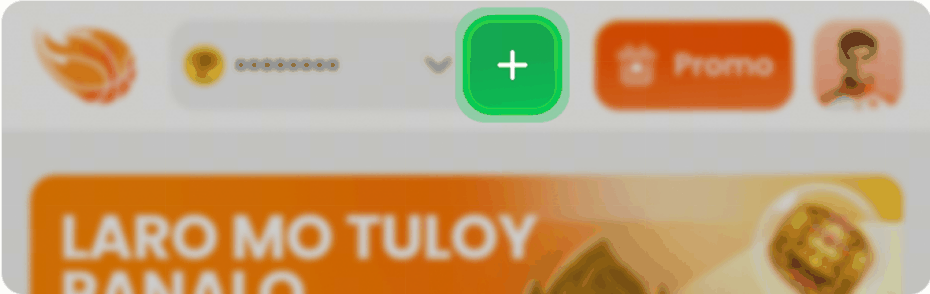
- Tap the + icon or your profile icon in the upper-right corner of the screen.
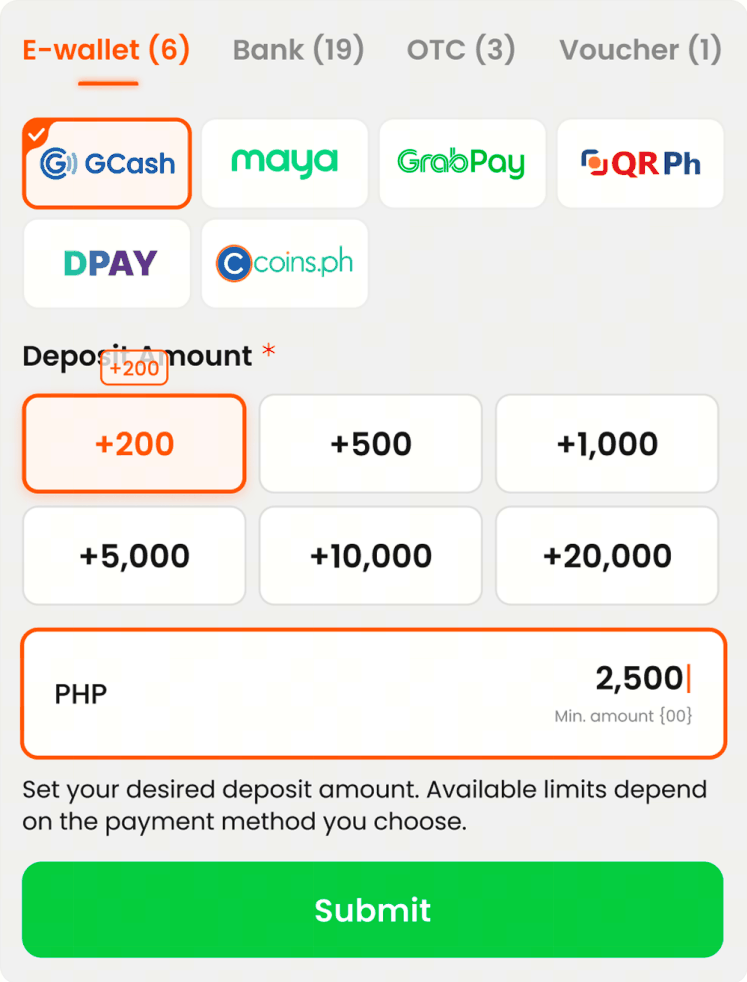
- Under E-Wallet, select GCash and enter your preferred deposit amount.
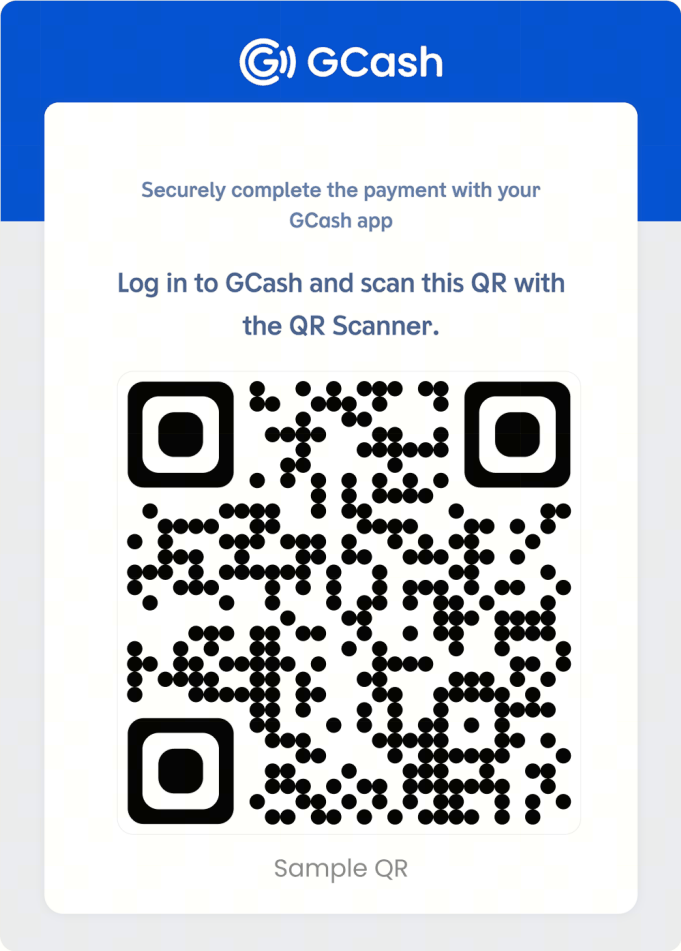
- Tap Submit, then log in to your GCash account and scan the QR code to complete the payment.
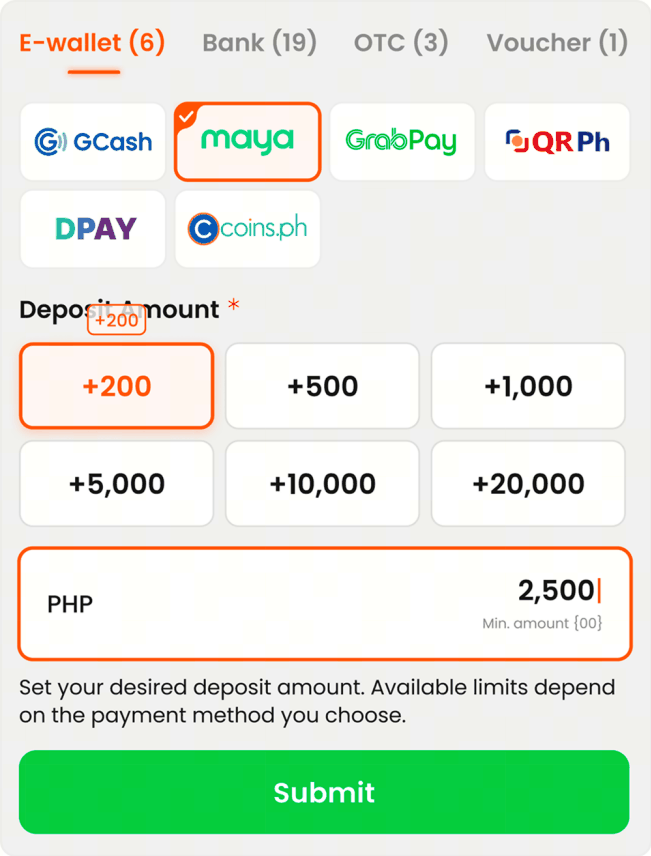
How do I deposit using Maya?
Follow these steps:
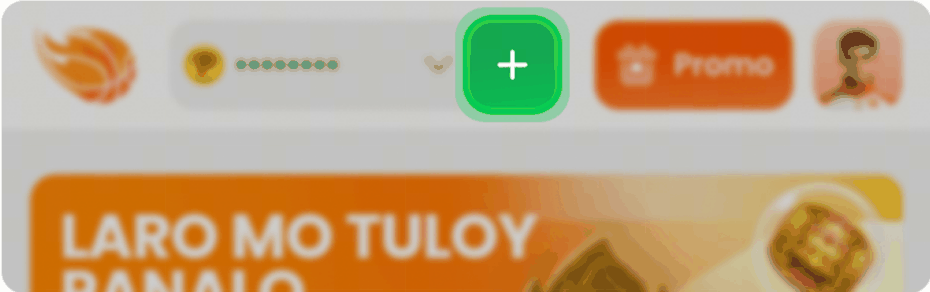
- Tap the + icon or your profile icon in the upper-right corner of the screen.
- Under E-Wallet, select Maya, then enter your preferred deposit amount and tap Submit.
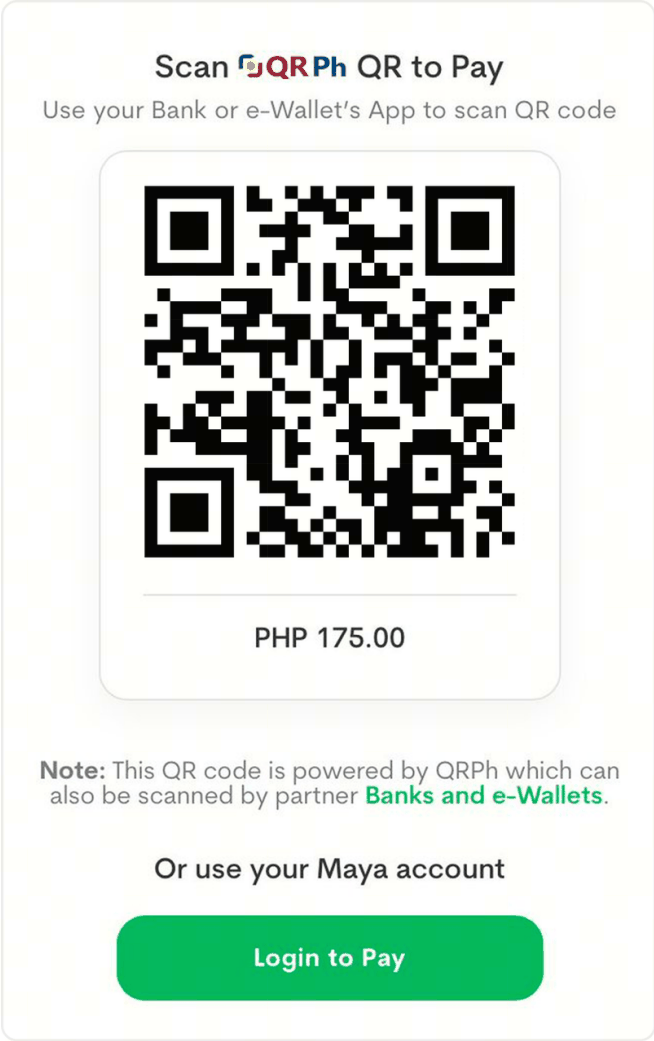
- Complete the payment using one of the following methods:
- Scan the QR code using the Maya app; or
- Tap Login to Pay and sign in to your Maya account.
What is the minimum and maximum deposit amount?
For your first deposit, the minimum amount is ₱500. Deposit limits for subsequent deposits may vary depending on the payment method. The maximum deposit amount is ₱50,000 per transaction.
Check the Cashier section for the limits applicable to your selected payment channel.
How long does a deposit take to reflect?
Most deposits made through GCash and Maya are reflected instantly or within a few minutes.
Deposits made through banks or over-the-counter payment channels may take longer to process, depending on the provider.
If your deposit has been deducted but has not been credited to your ArenaPlus account after a reasonable period, please contact Customer Support for assistance.
My deposit is still in 'Waiting' status. What should I do?
If your deposit is still showing a Waiting status but the amount has already been deducted from your GCash or Maya account, please contact Customer Support immediately.
To help us investigate your transaction, please prepare the following:
- Payment confirmation or deposit receipt
- Transaction reference number
- Date and time of the transaction
Are there any fees for deposits?
ArenaPlus does not charge any fees for standard deposits. However, your payment provider (e.g., bank, e-wallet) may apply its own charges.
Any applicable fees will typically be displayed before you confirm the transaction.
Withdrawals
What is the minimum withdrawal amount?
The minimum withdrawal amount is ₱1, while the maximum withdrawal amount per transaction is ₱500,000.
Note: If you are withdrawing through Pay&Go, your available balance must be at least ₱500 to use this withdrawal method.
What withdrawal methods are supported?
You can withdraw funds through GCash, Maya, and a wide range of Philippine banks via InstaPay and PESONet, including:
- BDO
- BPI
- UnionBank
- Metrobank
- RCBC
- Security Bank
- LANDBANK
- PNB
- Chinabank
- EastWest
- HSBC
How long does a withdrawal take to process?
Withdrawal requests are typically processed within 1 to 3 business days.
Withdrawals to GCash and Maya are usually processed the fastest and may be credited within 24 hours. Bank transfers may take 1 to 3 business days, depending on the receiving bank.
Processing times may be longer during weekends, public holidays, or when additional verification is required.
What is a Wallet Password?
Before making your first withdrawal, you must create a 6-digit Wallet Password.
Your Wallet Password is separate from your login password and is required each time you make a withdrawal. This additional security measure helps protect your funds and account.
To avoid delays when withdrawing, set up your Wallet Password in advance through your account's security settings.
Can I withdraw to a bank account under a different name?
No. For security and compliance purposes, withdrawals may only be processed to a bank account or e-wallet registered under your name.
This requirement helps prevent fraud and ensures compliance with Anti-Money Laundering (AML) regulations.
How many withdrawal methods can I add?
You can add up to 5 GCash accounts and 5 bank accounts to your ArenaPlus account for withdrawals.
Can I cancel a withdrawal request?
Withdrawal requests cannot be cancelled once they have been forwarded to the back-office team for processing.
Please review your withdrawal details carefully before submitting your request.
What verification is required for withdrawals?
You must complete KYC verification before you can make a withdrawal.
For larger withdrawal amounts, or when additional verification is required, we may ask you to submit supporting documents, such as:
- A selfie with your ID or;
- Proof of source of funds
These requirements help us comply with Bangko Sentral ng Pilipinas (BSP) and Anti Money Laundering Council (AMLC) regulations.
Betting
How do I place a sports bet?
Follow these steps:
- Log in to your account and tap Sports.
- Select the sport and event you want to bet on.
- Choose an In-Play (live) or upcoming event.
- Select your preferred market (e.g., Moneyline, Handicap, or Over/Under).
- Enter your stake, review the odds and potential payout, then tap Place Bet.
Note: Please review your bet carefully before confirming. Once a bet has been placed, it cannot be cancelled.
What types of odds does ArenaPlus offer?
ArenaPlus offers fixed-odds betting across all sports markets.
You can choose from six odds formats based on your preference:
- Decimal
- American
- Fractional
- Hong Kong
- Indonesian
- Malaysian
You can change your preferred odds format at any time by going to Sports → Settings → Odds Format.
How is my payout calculated?
Your payout is calculated based on your stake and the odds selected when your bet is placed. The potential payout, including your original stake, is displayed on your bet slip before you confirm your bet.
For bets using Decimal Odds, the calculation is:
Stake × Decimal Odds = Total Payout
Example:
If you place a ₱100 bet at odds of 2.50:
- Total Payout = ₱100 × 2.50 = ₱250
- Profit = ₱250 − ₱100 = ₱150
If your bet wins, the payout will be credited to your account. If your bet loses, your stake will be forfeited.
Unless otherwise stated in the applicable market or event rules, overtime and extra time are included in bet settlement.
What are the different bet types?
ArenaPlus offers several betting options to suit different play styles:
Basic Bet Types
- Single Bet ‒ A wager on a single selection. If your selection wins, your bet wins.
- Parlay Bet ‒ Combines two or more selections into one bet. All selections must win for the parlay to pay out.
- System Bet ‒ Combines multiple selections into several smaller parlays, allowing you to win even if not all selections are correct.
Popular Betting Markets
- Moneyline ‒ Bet on the winner of a match or event.
- Handicap ‒ One team or player is assigned a virtual advantage or disadvantage before the event begins.
- Over/Under (Totals) ‒ Bet on whether the total score, points, goals, or another statistic will be over or under a specified line.
- 1X2 ‒ Predict the outcome of a match: Home Win (1), Draw (X), or Away Win (2).
- Quarter/Half Betting ‒ Bet on the outcome of a specific quarter, period, inning, or half instead of the full game.
- Outright Betting ‒ Predict the winner of a tournament, league, championship, or season-long award.
- Prop Bets (Special Bets) ‒ Bet on specific events or outcomes within a game, such as player performance or team statistics. Availability may vary by event.
What is Cash Out?
Cash Out allows you to settle an eligible bet before the event ends, either to secure a profit or reduce a potential loss.
Cash Out is not available for all events or markets. Check your active bets to see whether the option is available for a specific wager.
What are the different bet statuses?
The following statuses may appear on your bets:
- Running — Your bet has been placed and is awaiting the outcome of the event.
- Rejected / Unsuccessful — Your bet was not accepted by the sportsbook, and your stake has been returned.
- Void — The bet has been cancelled, and your stake has been refunded.
- Won — Your bet was successful, and the winnings have been credited to your account.
Why was my bet voided?
A bet may be voided if an event is cancelled, abandoned, or does not meet the settlement criteria outlined in the applicable sport rules.
Bets may also be voided due to:
- Participant withdrawals
- Incorrect market information
- Pricing errors
- Other circumstances that prevent the market from being settled fairly
For full details, please refer to the applicable sport rules and house rules for your bet.
Why is my bet still showing as 'Open' after the match ended?
A bet may remain Open while official results are being confirmed or if there is a delay in settling the event or market.
This may occur if:
- The event has not been fully completed
- The results are under review
- Additional verification is required before the market can be settled
If your bet remains unsettled more than 24 hours after the event has ended, please contact Customer Support for assistance.
Can I cancel a bet after placing it?
No. Once a bet has been successfully placed and accepted, it cannot be cancelled, changed, or reversed.
Please review your selections, stake, and bet details carefully before confirming your bet.
Promotions & Bonuses
Where can I find current promotions?
Visit our Promotions page here to view current promotions.
New promotions may be added from time to time, so we recommend checking the page regularly for updates.
What is a bonus?
Bonuses are personalized offers designed to enhance your gaming experience. From time to time, we reward our players with different bonuses, so it is worth checking your notifications regularly.
With bonuses, you may be able to try games for free, such as through free bets or free spins, or use a bonus amount for betting.
Before using any offer, we recommend reviewing the applicable Terms and Conditions. If you have any questions, please contact Customer Support for assistance.
Where can I find my bonuses?
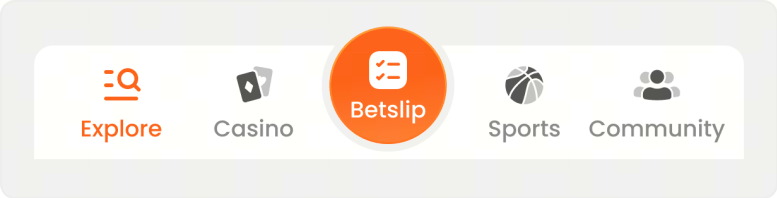
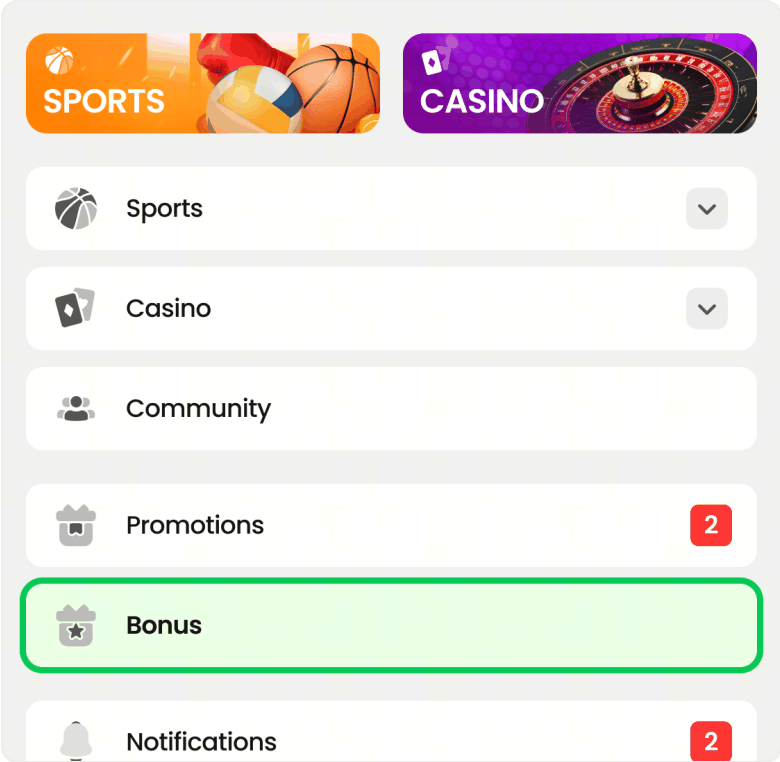
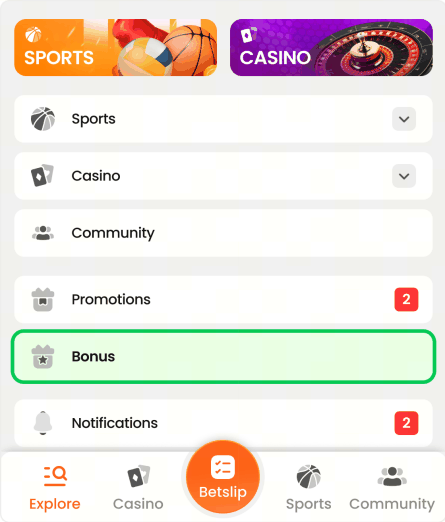
To find bonuses, tap Explore on the bottom navigation bar and select Bonus when using the mobile app. On desktop, select Bonus from the left menu.
What do terms like “claim”, “redeem”, and “activate” mean?
“Claim”, “redeem”, and “activate” refer to the actions you take to use a bonus. Claiming accepts the offer, redeeming applies it to your account, and activating starts its use so you can begin wagering or playing with it.
Please note that some bonuses may require you to complete certain requirements before you can receive them. In other cases, we may surprise you with special offers that you can use immediately.
Before using any bonus, we recommend reviewing the applicable Terms and Conditions. If you have any questions, please contact Customer Support for assistance.
What is wagering?
Wagering means that you need to place bets totaling a certain amount before you can withdraw your bonus and any winnings from it. This is a common requirement for many bonus offers.
The wagering requirement may vary for each bonus, so we recommend reviewing the applicable Terms and Conditions before using any bonus.
For example, if your bonus is ₱100 and the wagering requirement is 2x, you need to place settled bets worth ₱200 in accordance with the bonus requirements. Once the wagering is completed, the remaining bonus amount will be transferred to your real money balance.
If you have any questions, please contact Customer Support for assistance.
Can I complete wagering with real money?
It is important to review the applicable Terms and Conditions, as wagering rules may vary depending on the bonus offer.
In many cases, wagering can be completed using real money bets, but this depends on the specific bonus offer. In some cases, wagering may only be completed using your bonus balance.
If you have any questions, please contact Customer Support for assistance.
What should I do if I have enough bonus money but still cannot place a bet?
If you have enough bonus balance but still cannot place a bet, it usually means that one or more bonus requirements have not yet been met.
Please review the applicable Terms and Conditions carefully. Some bonuses can only be used for specific games, sports, markets, bet types, odds, or minimum bet amounts. It is also possible that another active bonus is linked to your account.
If everything appears to be in order but you still cannot place your bet, please contact Customer Support for assistance.
Can I use my bonus for any casino game or sports bet?
Not always. Each bonus has its own rules, and some offers can only be used for selected casino games, sports, markets, or bet types.
Before using your bonus, we recommend reviewing the promotion details and the applicable Terms and Conditions. This will help ensure that your game or bet is eligible so you can enjoy your bonus without any confusion.
Can I withdraw my bonus balance?
Bonus funds usually cannot be withdrawn directly. In most cases, you first need to complete the wagering requirements associated with the bonus.
Once the wagering is completed, the remaining bonus amount or eligible winnings will be transferred to your real money balance in accordance with the rules of the specific promotion. After that, you can withdraw the amount according to the general withdrawal rules.
What is cashback?
Cashback is a special bonus where we return a percentage of your losses from a specific period.
For example, if you had losses during a particular day or week, cashback can return part of those losses as a bonus, giving you another chance to play. The cashback percentage, calculation period, and usage rules may vary for each offer, so we recommend reviewing the promotion details before using any bonus.
What is a free bet?
A free bet is a bonus that allows you to place a sports bet without using your own real money.
It is a great way to try a market, a match, or a bet type with less risk. Please note that, in most cases, the free bet stake itself is not withdrawable. If your free bet wins, the winnings may become available in accordance with the rules of the promotion.
Why can’t I use my bonus on certain games, sports, markets, or bet types?
Some bonuses are created for specific products, games, sports, markets, or bet types. This means that not every bet or game will be eligible for every bonus.
These rules help keep promotions fair, clear, and sustainable for all players. Before using any bonus, we recommend reviewing the applicable Terms and Conditions so you know exactly where and how your bonus can be used.
If you are unsure whether your selected game or bet is eligible, please contact Customer Support for assistance.
Why did my bonus expire?
Your bonus may have expired because all bonuses come with a time limit. If the wagering requirements are not completed within that period, the bonus and any associated winnings will be forfeited.
To avoid missing out on your bonus, we recommend reviewing the promotion details and the applicable Terms and Conditions before using any offer.
What happens if I withdraw before completing the wagering requirements?
If you withdraw before completing the wagering requirements, your bonus and any winnings associated with it will be canceled and removed from your account.
Can I have more than one active bonus at the same time?
Usually, only one bonus can be active at a time, and any new bonus may need to wait until the current bonus has been completed or has expired.
How can I check the status of my bonus?
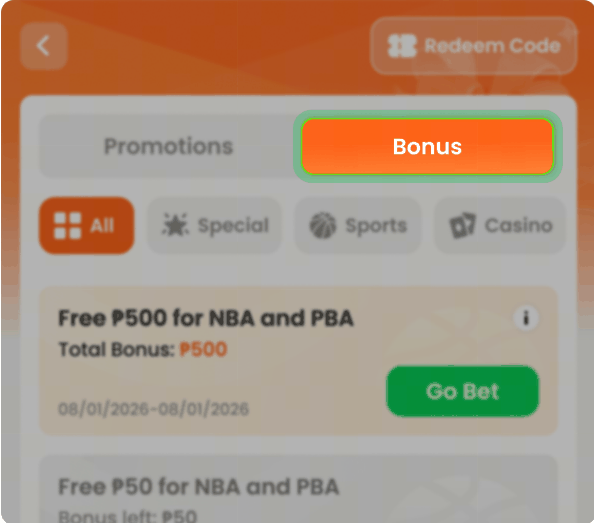
You can check the status of your bonus in the Bonus section under Explore. There, you can view details such as the remaining balance, wagering progress, and expiration date.
To access this section, tap Explore in the bottom navigation bar, then tap Bonus.
Why was my bonus removed?
Your bonus may have been removed if it expired or if you did not meet the promotion's Terms and Conditions, such as wagering requirements or eligibility rules.
If you have any questions, please contact Customer Support for assistance.
Who should I contact if I have a problem with my bonus?
If you have a problem with your bonus, please contact Customer Support for assistance.
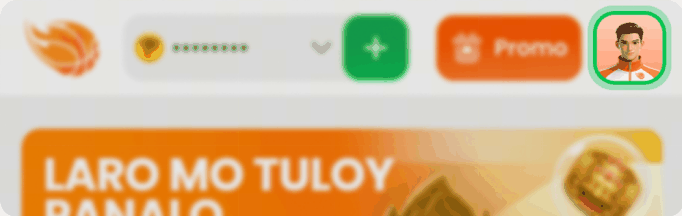
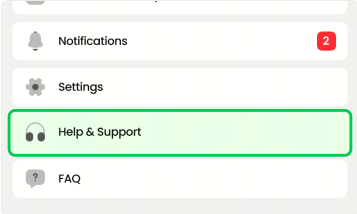
To access Customer Support, tap your profile icon in the upper-right corner of the screen, then select Help & Support.
Responsible Gaming
What is Responsible Gaming on ArenaPlus?
Responsible Gaming refers to the tools and features available to help you manage your gaming activity and stay in control of your play.
At ArenaPlus, we are committed to promoting a safe and responsible gaming environment and helping players minimize the risks associated with excessive gaming.
You can access these settings by going to Profile → Settings → Responsible Gaming.
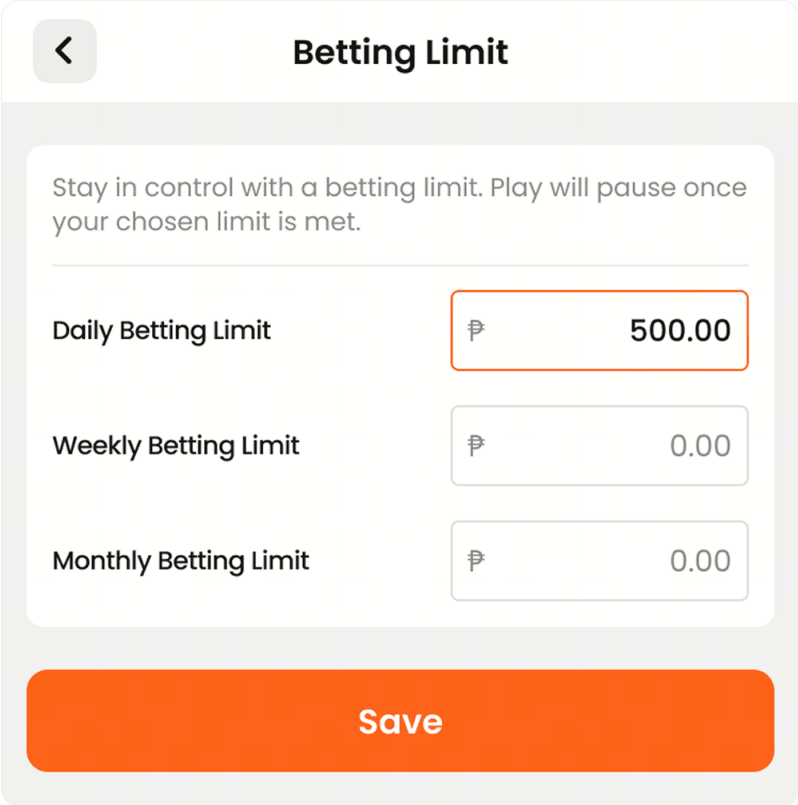
What are Betting Limits?
Betting Limits are Responsible Gaming tools that help you control how much you can spend on bets over a specific period.
You can set:
- Daily Betting Limit ‒ The maximum amount you can bet per day.
- Weekly Betting Limit ‒ The maximum amount you can bet per week.
- Monthly Betting Limit ‒ The maximum amount you can bet per month.
To set your Betting Limits:
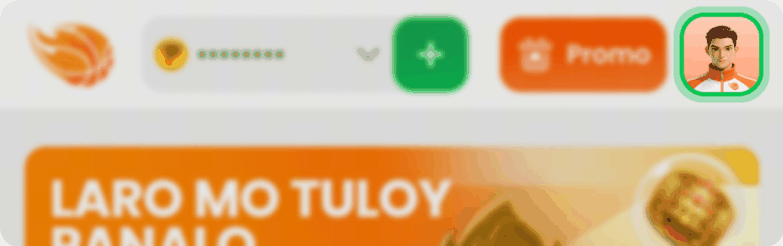
- Tap your profile icon in the upper-right corner of the screen.
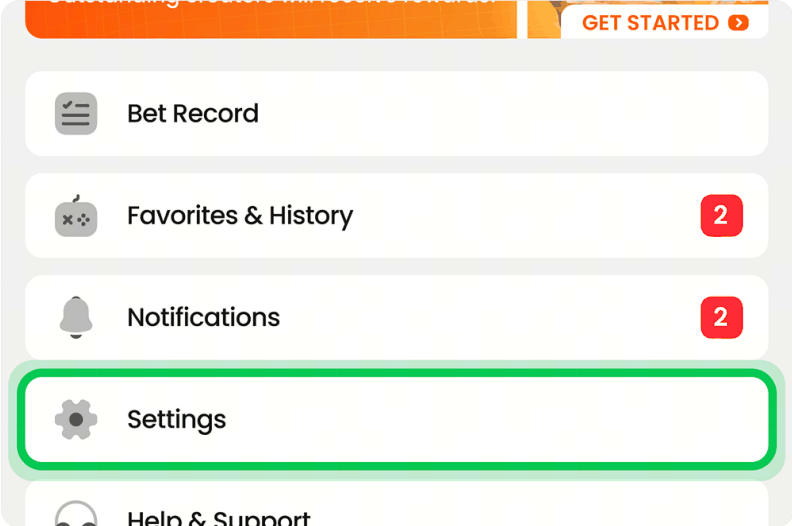
- Tap Settings.
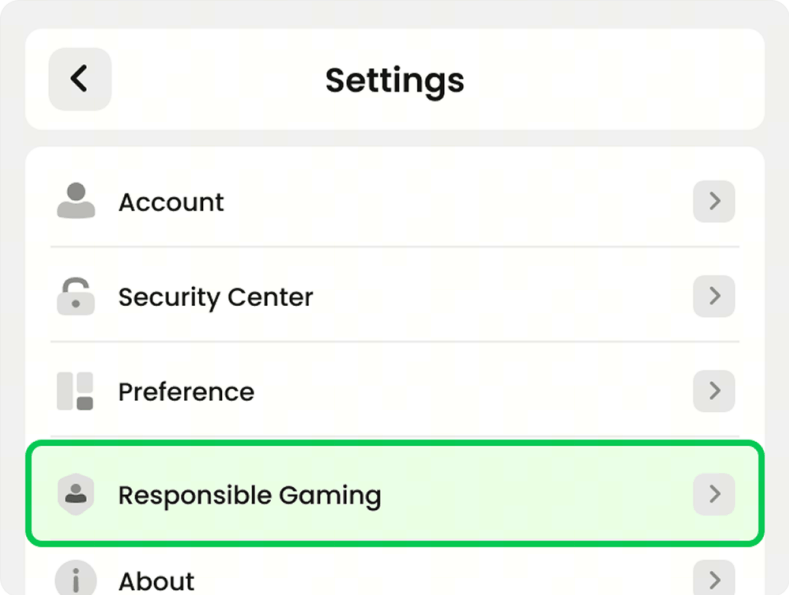
- Under Settings, tap Responsible Gaming.
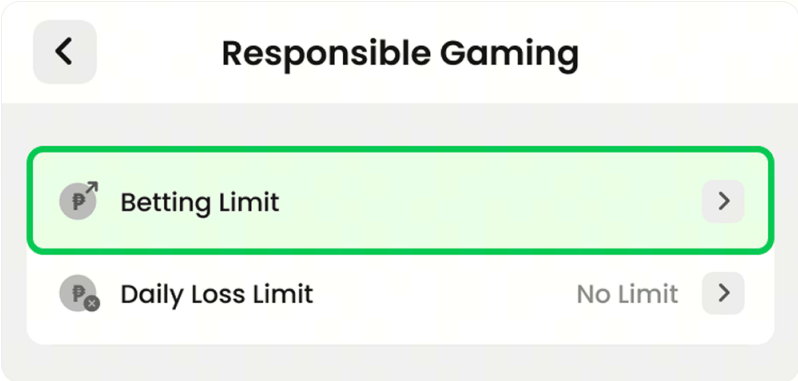
- Tap Betting Limit.
- Enter your preferred daily, weekly, and/or monthly betting limits, then tap Save.
What is the Daily Loss Limit?
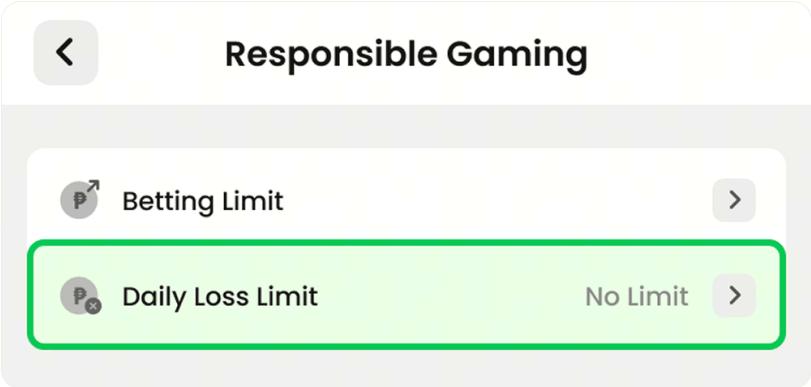
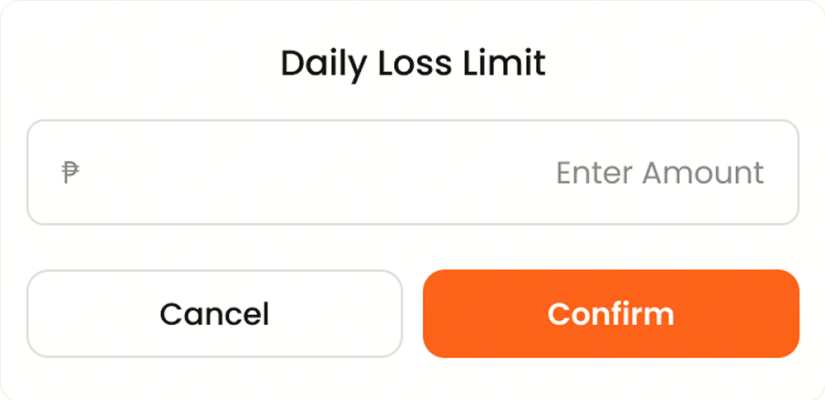
The Daily Loss Limit lets you set the maximum amount you're willing to lose in a single day. Once this limit is reached, you may no longer be able to place additional bets for the rest of the day. This helps you manage your spending and stay in control of your play.
To set your Daily Loss Limit:
- Tap your profile icon in the upper-right corner of the screen.
- Tap Settings.
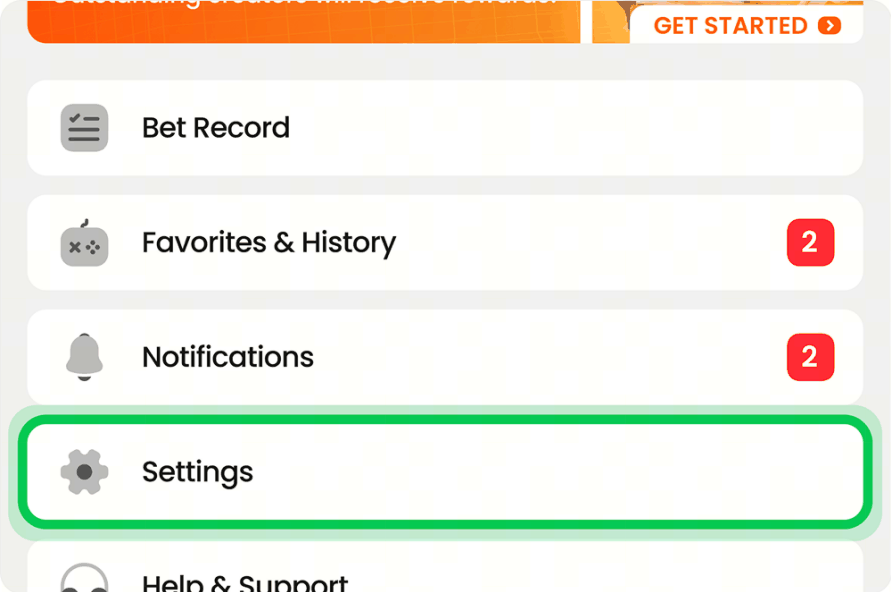
- Tap Responsible Gaming.
- Select Daily Loss Limit.
- Enter your preferred limit amount, then tap Confirm.
Where can I get help for a gambling problem?
If you or someone you know needs support, you may contact any of the following organizations for assistance:
- Gamblers Anonymous Philippines — 0915-938-2808 | gaphilippines.com
- Seagulls Flock Organization — seagullsflock.org
- EmbracePlus — Smart: 0908-235-5235 | Globe: 0956-392-1294
- National Center for Mental Health (NCMH) — (02) 8531-9001 Local 301/304 (PACD) | ncmh.gov.ph
- C.A.R.E. Treatment & Rehabilitation Center — 0917-898-2935
Need help managing your ArenaPlus account? You can also contact Customer Support to activate self-exclusion or set Responsible Gaming limits on your account.
AML & Security
What is AML compliance and why does it apply to me?
AML (Anti-Money Laundering) compliance refers to the measures ArenaPlus takes to prevent money laundering, fraud, and other illegal activities.
In accordance with Philippine laws and regulations, we may verify your identity, monitor transactions, and report suspicious activity to the appropriate authorities when required.
Will my identity and transactions be checked?
Yes. As part of our Anti-Money Laundering (AML) obligations, we may verify your identity through our Know Your Customer (KYC) process and review your transaction activity to help detect fraud, money laundering, or other suspicious activity.
We may also report unusual activity to the appropriate authorities as required by law.
All records are stored securely and are only accessible to authorized personnel.
What happens if suspicious activity is detected on my account?
If we detect activity that may be linked to money laundering, fraud, or other illegal financial activity, we may temporarily restrict, suspend, or permanently close your account.
As required by law, we may also report suspicious activity to the appropriate authorities and cooperate with any related investigations.
What should I do if I suspect unauthorized access to my account?
If you suspect unauthorized access to your account, change your password immediately and enable two-factor authentication (2FA).
Next, contact Customer Support via live chat to report the issue. We may temporarily restrict access to your account while the matter is being investigated.
To help keep your account secure, always log out when using shared devices and never share your login credentials with anyone.
How is my personal data protected?
ArenaPlus uses SSL (Secure Socket Layer) encryption to help protect data transmitted between your device and our servers.
Financial information is not stored in plain text, and all payment processing is conducted in accordance with PCI-DSS security standards.
Personal and transaction data are stored and retained in accordance with applicable legal and regulatory requirements and are accessible only to authorized personnel.
Can AML rules change?
Yes. ArenaPlus may update its AML (Anti-Money Laundering) requirements to comply with changes in Philippine laws or PAGCOR regulations.
If AML requirements are updated, players may be asked to provide additional information or complete additional verification steps to continue using certain services.
By continuing to use ArenaPlus, you agree to comply with any updated AML requirements.
Technical Support
Why is my game balance locked or not syncing?
Your game balance may appear locked or out of sync for several reasons, including:
- An unstable internet connection causing delays in communication with the server
- Scheduled maintenance by the game provider
- Temporary technical issues affecting balance updates
Note: This issue is usually temporary. Try closing and reopening the game, then check your balance again.
If you're still having trouble after maintenance has been completed, please contact Customer Support for assistance.
What should I do if a game is not loading?
If a game is not loading properly, try the following steps:
- Refresh the page or restart the app.
- Check your internet connection. A stable connection is recommended for the best gaming experience.
- Update the ArenaPlus app to the latest version.
If the game still does not load after completing these steps, please contact Customer Support and provide the game name along with a screenshot of the issue.
How do I report a technical issue?
You can report technical issues through any of the following channels:
- Live Chat — Available 24/7 on the ArenaPlus app
- Email — [email protected]
- Phone — +63 285390285 (standard call rates may apply)
To help us investigate the issue, please provide:
- Your username
- Your device model and app version
- A description of the issue
- Any relevant screenshots or screen recordings
How can I avoid my bet being rejected on a live event?
While bet acceptance cannot be guaranteed during live events, the following steps may help reduce the likelihood of a rejection:
- Place your bet promptly, as odds can change quickly during live play.
- Use a stable internet connection to help prevent delays in submitting your bet.
- Ensure you have sufficient available balance before placing your bet.
What are the minimum system requirements to play?
To use ArenaPlus, your device should meet the following minimum requirements:
Web Browser
ArenaPlus supports the latest versions of major web browsers, including:
- Google Chrome
- Mozilla Firefox
- Safari
- Microsoft Edge
Mobile App
- Android
- Android 8.0 or later
- iOS
- iOS 17.0 or later
Memory
- Minimum of 2 GB RAM
For the best experience, especially when playing live casino games or using streaming features, we recommend a stable internet connection of at least 5 Mbps.
Why is my withdrawal not showing up?
Withdrawal processing times vary depending on the payment method and typically take 1 to 3 business days.
To check the status of your withdrawal, go to Transaction History in your account.
- If your withdrawal is marked Pending, it may still be under review or being processed.
- If your withdrawal is marked Processed but the funds have not been received, please check with your bank or e-wallet provider.
If more than 5 business days have passed and you still have not received your withdrawal, please contact Customer Support and provide your transaction ID for assistance.
The app is crashing or freezing. What should I do?
If the ArenaPlus app is crashing or freezing, try the following:
- Close the app completely, then reopen it.
- Make sure you are using the latest version of the ArenaPlus app.
- Free up storage space on your device and close any unnecessary apps running in the background.
If the issue persists, uninstall and reinstall the ArenaPlus app.
If the app continues to crash or freeze after completing these steps, please contact Customer Support and provide the following information:
- Device model
- Operating system version
Still need help?
Reach our support team by live chat or email. Have your registered mobile number ready.
Play responsibly
For players 21 and over only. Gambling can be addictive; set limits and know when to stop.